
Desk setups often suffer from a tangle of cables, and connecting multiple screens usually brings endless compatibility headaches. Having thoroughly reviewed the market and buyer feedback, I have analyzed how these hubs perform in real office environments. Tested data shows clear winners emerge when you demand a quad monitor configuration. Let us look at how they rank.
1. TobenONE DisplayLink Docking Station 4 Monitors, 4K USB C/HDMI for Video | 120W Adapter, 6 USB (10Gbps USB A, 18W USB C charing phone), 2.5Gbps Gigabit Ethernet, for M1-M5 Macbook/Windows OS Laptops

Earning its ranking squarely through sheer versatility, this hub delivers an impressive 19 functional ports that instantly banish desk clutter. I really appreciate how it centralizes your entire peripheral collection into a single chassis.
You get four HDMI ports alongside high-speed data connections, making it a dependable anchor for a busy desk. I would note that macOS users need to keep in mind the slight limitation where two of the HDMI ports cannot operate simultaneously.
Buyers frequently praise the massive port selection for organizing messy desk wires.
Users highlight the convenience of powering both a laptop and a phone from the same unit.
Reviewers note that installing the correct driver is essential before connecting external displays.
Get It From Amazon Now: Check Price on Amazon & FREE Returns
2. WAVLINK DisplayLink Laptop Docking Station Quad Monitor 4K@60Hz for MacBook | 100W PD Charging for Laptop with Thunderbolt 5/4/3, USB-C/A – M1-M5 Mac/Neo/Windows- 4 HDMI, 4 DP, SD 4.0, 2.5Gbps LAN

Professionals who demand absolute visual clarity will find this hub suits their high-end creative workflows best. I consider this my top overall recommendation because it balances 5K ultrawide resolution with rock-solid stability.
The inclusion of quad DisplayPort outputs ensures your graphics remain crisp and vibrant across every screen. I do wish the power adapter footprint was slightly smaller, but the massive 180W output easily justifies the desk space it occupies.
Customers regularly mention the exceptional clarity of the multi-screen 4K output.
Buyers appreciate the rapid file transfer speeds enabled by the built-in card reader.
Users note the reliable power delivery keeps demanding laptops fully charged during heavy tasks.
Get It From Amazon Now: Check Price on Amazon & FREE Returns
3. TobenONE Docking Station 5 Monitors, Cooling Fan, 8K+Quad 4K@120Hz Display | Single 8K, 45W Fast Charging, 2.5GbE, SD/MicroSD4.0, DisplayLink Dock for Thunderbolt MacBook Windows, Driver Required DL7400

An unexpected feature that instantly catches the eye is the built-in cooling fan, which actively manages thermal output during heavy computing sessions. I find this engineering choice brilliant for preventing thermal throttling when driving massive pixel counts.
This powerhouse handles up to five screens, offering a staggering 8K plus quad 4K configuration for extreme workstations. I think it is overkill for casual spreadsheet work, but power users will love the sheer headroom.
Users note that the active cooling fan keeps the hardware running smoothly under heavy loads.
Buyers emphasize the value of the ultra-fast 2.5Gbps Ethernet port for lag-free network tasks.
Reviewers highlight the robust power supply as a major asset for multi-display setups.
Get It From Amazon Now: Check Price on Amazon & FREE Returns
4. DisplayLink Docking Station 4 Monitors, 15 in 1 Laptop Docking Station | Quad 4K 60Hz HDMI, 100W PD, Thunderbolt 3/4 Input, USB 3.2 10Gbps, SD/TF, Audio and Ethernet Port, for MacBook Pro/Air M1-M5

The most common buyer complaint centers on the initial driver setup, which can occasionally trigger administrative hurdles on corporate machines. I want to emphasize that once you grant the necessary permissions, the performance stabilizes beautifully.
This model offers a clean 15-in-1 layout that keeps your daily workflow organized without unnecessary bulk. I find the port selection strikes a wonderful balance for standard office productivity tasks.
Customers frequently mention the straightforward layout of the fifteen integrated ports.
Buyers advise following the specific permission prompts carefully on macOS systems.
Users note that HDCP-protected streaming content may not display correctly on virtual drivers.
Get It From Amazon Now: Check Price on Amazon & FREE Returns
5. USB C Docking Station 4 Monitors, LIONWEI 13-in-1 USB C Hub for Laptop Mac | Triple 4K, Dual HDMI+DP+VGA, 10Gbps, 100W PD, Ethernet, SD/TF, 6 USB C/A Ports, USB C Dock for MacBook/Dell/HP/Lenovo/Surface
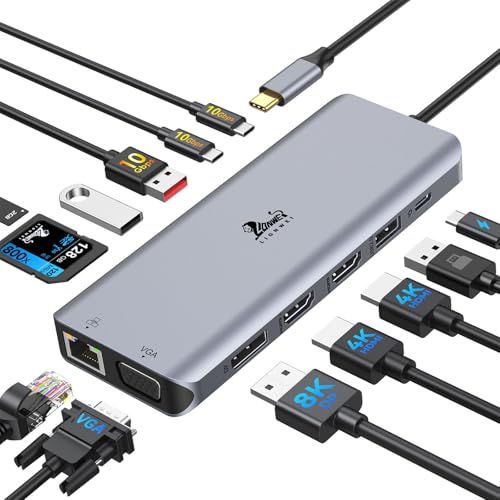
Stepping away from the purely DisplayLink-driven models above, this option relies on traditional video outputs to handle your legacy gear. I view this as a more traditional alternative for users who still rely heavily on VGA and DisplayPort connections.
It provides decent multi-display support, though macOS users should note it only extends to a single external monitor. I would suggest checking your laptop ports carefully because video output depends heavily on DP Alt Mode compatibility.
Buyers appreciate the inclusion of legacy ports like VGA for older office displays.
Users highlight the straightforward plug-and-play setup for compatible Windows machines.
Reviewers note that power delivery is slightly reduced because the hub consumes a small share of wattage.
Get It From Amazon Now: Check Price on Amazon & FREE Returns
Choosing Between Them
When building a complex workstation, I always point people toward the Wavlink Quad Monitor dock as my ultimate top pick because of its unmatched high refresh rate performance. Matching the right hardware to your specific workflow remains essential, whether you choose the versatile everyday connectivity of the TobenONE 19-in-1 for standard office tasks or the extreme multi-display power of the DL-7400 for financial trading. I must remind you that multi-monitor adapters demand patience with DisplayLink driver requirements, so always verify your laptop specifications before purchasing.
As an Amazon Associate, this site earns from qualifying purchases. Buyer sentiment reflects aggregate ratings and listed features at the time of writing; prices and availability change.
