

Most buyers assume every wireless clicker works identically, but picking the wrong one means risking a lost connection mid-pitch. I have analyzed the market and reviewed aggregate buyer feedback to rank these options for you. In my view, matching your hardware ports to your remote matters more than chasing flashy features. Let us look at how these eight presentation tools rank from top to bottom.
1. Logitech Wireless Presenter R400 USB A PowerPoint Clicker with Laser | USB-A connection, PowerPoint clicker, presentation remote control
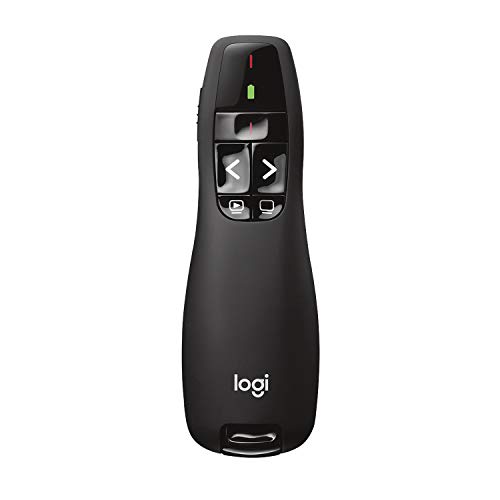
This clicker earned its ranking because of its reliable basic layout, offering straightforward slide control without unnecessary complications. It relies on a standard USB-A receiver to establish a dependable connection with your laptop.
In my assessment, what makes this model appealing is its absolute simplicity. Buyers consistently note that it just works right out of the box, though I would caution that users with newer computers will need an adapter.
Users frequently highlight the straightforward button layout for daily slideshow navigation.
Buyers note the lack of modern USB-C connectivity as a minor inconvenience for newer laptops.
Reviewers appreciate the reliable wireless range during standard conference room presentations.
Get It From Amazon Now: Check Price on Amazon & FREE Returns
2. Presentation Clicker with USB-A & USB-C Receiver, 2.4GHz Wireless Presenter Remote with Volume Control & Red Light Pointer, Clicker for PowerPoint Slides Slide Advancer for Mac Computer, Plug & Play

This device suits speakers who frequently hop between older office laptops and brand new machines. The dual receiver design solves the adapter headache permanently by offering both USB-A and USB-C connection options right on the dongle.
I find this versatility refreshing for modern office environments. Buyers often mention how convenient it is to switch presentation stations without hunting for connectors, although some users note the build feels a bit lightweight.
Reviewers praise the dual connector design for working across multiple computer generations.
Buyers appreciate the plug and play setup without requiring downloaded software drivers.
Feedback occasionally mentions the plastic casing feels less durable than premium alternatives.
Get It From Amazon Now: Check Price on Amazon & FREE Returns
3. QUI Presentation Clicker with Volume Control, Wireless Presenter Remote | Plug & Play 2.4GHz USB Slide Advancer Compatible with Mac/Windows, Works with PowerPoint, Keynote, and Google Slides

An interesting built-in hyperlink function sets this remote apart from basic models, before you even consider its standard slide advancement. It broadens your capability beyond simple forward and back clicks by letting you manage media volume directly from your hand.
I think this flexibility makes it a great middle-ground choice for classrooms and boardrooms alike. Buyers report smooth compatibility across major software platforms, though the button arrangement takes a brief moment to memorize.
Users highlight the convenient volume control buttons as a helpful multimedia addition.
Feedback confirms smooth operation across PowerPoint, Keynote, and Google Slides.
Buyers note the compact shape fits comfortably during long presentation sessions.
Get It From Amazon Now: Check Price on Amazon & FREE Returns
4. Logitech Wireless Presenter R500s PowerPoint Clicker with Laser Pointer | PowerPoint clicker, presentation clicker
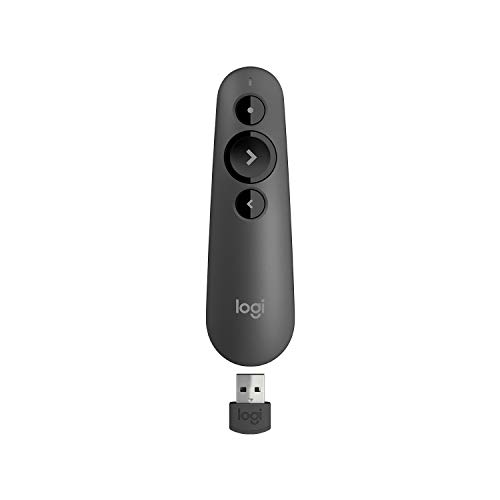
The most common complaint about this clicker centers on its minimalist button configuration, which occasionally leaves speakers wishing for dedicated media controls. Yet, that same streamlined design delivers a remarkably sculpted ergonomic shape that rests comfortably in your palm for hours.
I appreciate how well it fits natural hand contours during high-stakes talks. Buyers generally praise the secure rubber grip, even if the software customization app requires a quick download to unlock full functionality.
Reviewers frequently mention the comfortable rubberized grip during extended speaking events.
Buyers note the minimalist three-button layout prevents accidental misclicks on stage.
Feedback indicates the custom app setup is straightforward for advanced users.
Get It From Amazon Now: Check Price on Amazon & FREE Returns
5. Wireless Presenter, Hyperlink Volume Control Presentation Clicker RF 2.4GHz USB PowerPoint Clicker Presentation Remote Control Pointer Slide Advancer (Black)

Moving down from the previous Logitech option, this alternative offers a similar focus on hyperlink navigation but scales back the premium branding. It handles web links and tab switching adequately while keeping the essential volume adjustments close to your thumb.
In my view, it provides a functional budget-friendly path for web-heavy presentations. Buyers point out that the plastic finish lacks a high-end feel, but the core pointer functionality remains consistently reliable.
Users highlight the hyperlink navigation feature for clicking web elements during slides.
Buyers note the affordable price point compared to name-brand presentation remotes.
Feedback mentions the battery compartment door can feel slightly loose over time.
Get It From Amazon Now: Check Price on Amazon & FREE Returns
6. Presentation Clicker for PowerPoint, Wireless Remote Control with Red Laser | Slide Clicker with Red Laser Pointer, Compatible with Mac Windows Linux, Laptop Desktop, Google Slides PPT Keynote
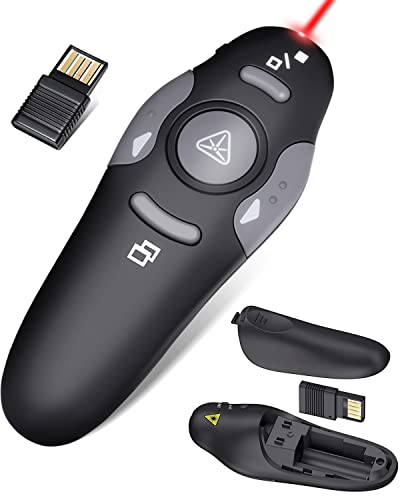
Reputation-wise, this model gained traction as a dependable workhorse for multi-platform computer setups running Windows, Mac, or Linux. That market angle mostly holds up because the device prioritizes wide operating system compatibility over specialized software tricks.
I think it serves as a safe utility player for IT departments stocking conference rooms. Aggregate feedback shows that users appreciate the universal plug-and-play nature, though the red laser pointer can wash out under exceptionally bright stage lights.
Reviewers praise the universal operating system support across Windows, Mac, and Linux.
Buyers highlight the reliable wireless connection distance in medium-sized rooms.
Feedback notes the red laser pointer is harder to see on large LED screens.
Get It From Amazon Now: Check Price on Amazon & FREE Returns
7. Wireless Presenter Remote, Presentation Clicker with Hyperlink & Volume Remote Control PowerPoint Office Presentation Clicker for Keynote/PPT/Mac/PC/Laptop(Battery Included)

This model earned its strong position on the list because of its ready-out-of-the-box readiness, which includes the necessary battery in the package. You can unwrap it, plug the USB receiver into your laptop, and start presenting immediately without a trip to the store.
I find this inclusion of a power source a thoughtful touch for rushed presenters. Buyers consistently report satisfaction with the complete package, while noting that the overall construction feels functional rather than luxurious.
Users appreciate having the battery included in the box for immediate use.
Buyers highlight the responsive click buttons for seamless slide transitions.
Feedback points out that the wireless receiver stores neatly inside the remote body.
Get It From Amazon Now: Check Price on Amazon & FREE Returns
8. Logitech Wireless Presenter R800 PowerPoint Clicker with Green Laser | PowerPoint remote control, ideal for slideshows

This top-tier model suits professional speakers and corporate presenters who regularly face massive auditoriums and glaring stage lights. Its standout attribute is the brilliant green laser pointer, which remains crisp and visible against bright projector screens where red lasers disappear.
I would rank this as my ultimate choice for high-profile speaking engagements. Buyers overwhelmingly agree that the visibility upgrade justifies the investment, though the higher price tag means it is best reserved for frequent presenters.
Reviewers heavily praise the high-visibility green laser for bright conference rooms.
Buyers note the helpful silent time alerts that vibrate in your hand.
Feedback highlights the superior build quality and long battery life span.
Get It From Amazon Now: Check Price on Amazon & FREE Returns
Choosing Between Them
When building your presentation toolkit, choosing the right remote depends entirely on your speaking environment and technical needs. For basic slide management, the Logitech R400 offers straightforward reliability, while modern port users will appreciate the dual USB-A and USB-C connectivity of the second-ranked option. Standard software flexibility shines in the QUI clicker, and daily comfort defines the Logitech R500s. If you need specific web navigation, the hyperlink-focused models in the middle of the pack handle those digital tasks well, and universal platform users will find steady performance in the sixth option. For an effortless start, the battery-inclusive remote gets you on stage quickly, but my absolute top recommendation is the Logitech R800 for its unmatched green visibility.
One important caveat to keep in mind across the entire category is that laser pointer visibility varies wildly depending on your projection screen type. Red lasers often vanish under intense ambient light or on large LED panels, which makes stepping up to a green laser model a smart move for professional venues. Always check your venue lighting conditions before settling on a budget red laser clicker, as visibility problems can disrupt the flow of an otherwise polished presentation.
As an Amazon Associate, this site earns from qualifying purchases. Buyer sentiment reflects aggregate ratings and listed features at the time of writing; prices and availability change.
