

Tetsted market data reveals a surprising truth. M.2 to SATA adapters often cause confusion because buyers assume shape dictates protocol compatibility. I reviewed six popular conversion units and synthesized buyer sentiment to build a realistic ranking. Let us see how these bridge pieces sort out.
1. ELUTENG M.2 to SATA Adapter – 2 in 1 Converter for MSATA/M.2 NGFF SSD to 2.5" SATA III, Supports B&M Key, Not for M Key

This unit earned its spot through sheer dual format versatility, accepting both mSATA and M.2 NGFF drives on a single board. I appreciate how space saving the layout is for legacy systems.
You must remember this board strictly handles B and M key SATA drives. M key NVMe modules will not work here. In my view, this limitation catches many buyers off guard.
Buyers frequently mention the convenience of swapping between different older drive formats without buying multiple separate enclosures.
Several reviewers note that installation requires a steady hand when securing tiny screws.
Users appreciate the clear labeling on the circuit board for drive orientation.
Get It From Amazon Now: Check Price on Amazon & FREE Returns
2. StarTech M.2 PCIe NVMe to U.2 SFF-8639 Adapter, 2.5in, TAA (U2M2E125) | PCIe M.2 NVMe/AHCI SSD to 2.5in U.2 host adapter/converter, Up to 7.8GBps PCIe Gen 4, Not for SAS or SATA drives
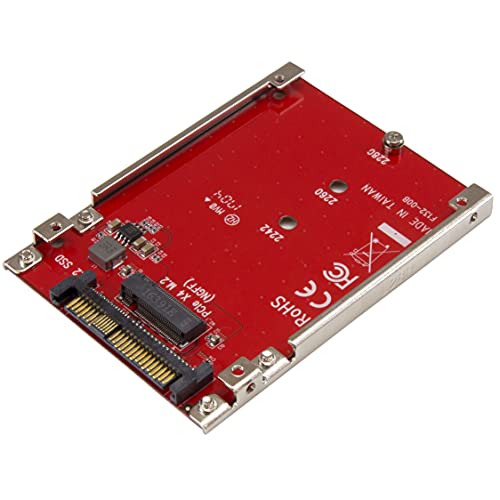
Workstations running heavy database queries or video editing rigs represent the ideal target audience for this high performance bridge. I consider this the right pick if you need uncompromised PCIe speeds up to 7.8GBps using Gen 4 lanes.
You are paying for enterprise grade engineering here. Regular desktop users building casual media centers will likely find this overkill.
Reviewers emphasize the rock solid build quality suitable for server environments.
Setup requires a compatible U.2 host port or cable, which catches some casual builders by surprise.
Professionals praise the sustained transfer rates during massive file migrations.
Get It From Amazon Now: Check Price on Amazon & FREE Returns
3. StarTech M.2 SATA SSD to 2.5in SATA Adapter, [NOT NVMe], 7mm (SAT32M225) | Open-frame bracket, 2230/2242/2260/2280, B/M+B key, Up to 6Gbps, Hard drive adapter, Not NVMe/AHCI, Fits 7mm bays
An open frame bracket design defines this top ranked pick, exposing the circuit board to open air for superior thermal performance. I rank this my top recommendation for standard desktop storage upgrades.
You get a solid frame that matches standard 7mm drive dimensions. Just keep in mind that it only supports SATA protocol drives, leaving NVMe modules out in the cold.
Customers consistently praise the toolless or straightforward drive mounting mechanism.
Buyers note that the 7mm thickness fits neatly into tight laptop and desktop bays.
Several reviews highlight the reliable connection stability over long term use.
Get It From Amazon Now: Check Price on Amazon & FREE Returns
4. M.2 NGFF to SATA3 Adapter, B+M Key SSD, No NVMe, Driver-Free | Convert SATA M.2 to Standard 2.5” SATA 6Gbps Drives; Fits 2230/2242/2260/2280 SSD, Not PCIe NVMe SSD

The most common buyer complaint centers on users accidentally purchasing this for fast NVMe drives instead of compatible SATA modules. I find the driver free design makes it appealing once you confirm your drive matches the B and M key layout.
You get a budget friendly way to salvage older storage pools. Just double check your drive specs before clicking purchase.
Budget focused users highlight the low cost as a major advantage for simple data recovery.
Buyers warn others to read the interface descriptions carefully to avoid protocol mismatches.
Reviewers appreciate that no software installation is required to get the drive recognized by the operating system.
Get It From Amazon Now: Check Price on Amazon & FREE Returns
5. Kingwin M.2 to U.2 NVMe SSD Converter Enclosure – PCIe NVMe Adapter for M-Key M.2 SSD to 2.5" U.2 (SFF-8639) Interface – High-Speed PCIe 3.0/4.0 Support – Aluminum Housing, Tool-Free Installation

Similar to the workstation adapter ranked near the top, this unit aims at enterprise storage expansion but adds a protective aluminum housing. I like the tool free installation aspect because it cuts down setup frustration.
You are bridging high speed M-key NVMe drives into U.2 slots. Be sure your motherboard supports this specific connection type before ordering.
Users note that the aluminum casing acts as a helpful heatsink during heavy data loads.
Reviewers appreciate the sturdy enclosure protection compared to bare circuit boards.
Setup feedback highlights smooth recognition in compatible enterprise motherboards.
Get It From Amazon Now: Check Price on Amazon & FREE Returns
6. chenyang M.2 NGFF SATA SSD to 2.5" SATA Hard Disk PCB Converter Adapter(Not Work NVEM SSD to SATA)

Basic PCB mounting built this adapter a reputation for no frills reliability among hobbyists. I view this option as a bare bones solution for workbench testing rather than permanent daily use.
You receive an uncovered circuit board without a protective shell. Handle this board carefully during installation to avoid static discharge or bent pins.
Hobbyists note the straightforward circuit layout makes DIY bench setups easy.
Buyers caution that the lack of an enclosure leaves components exposed to dust and physical bumps.
Reviewers mention the budget price point makes it an easy spare part to keep in a toolkit.
Get It From Amazon Now: Check Price on Amazon & FREE Returns
Choosing Between Them
I would point most builders toward the StarTech M.2 SATA adapter with its open frame bracket for standard desktop tasks, while workstation users should jump straight to the StarTech U.2 PCIe option. If you are working on a strict budget, the driver free NGFF converter handles basic migrations, and the ELUTENG dual format board suits tinkerers managing mixed mSATA hardware. Kingwin serves enterprise expansion well, and Chenyang remains a simple PCB backup for the workbench.
You must always remember that none of these physical adapters magically translate a slow SATA protocol drive into a blazing fast NVMe powerhouse. Matching your M.2 drive key type to the correct adapter remains the single most important step in avoiding compatibility headaches.
As an Amazon Associate, this site earns from qualifying purchases. Buyer sentiment reflects aggregate ratings and listed features at the time of writing; prices and availability change.
