

The primary factor separating a reliable docking station from a paperweight is firmware stability. I have reviewed these nine options by weighing technical specs against common buyer feedback to ensure you avoid connectivity headaches. In my view, choosing a dock is less about finding the ultimate device and more about matching power delivery to your specific laptop needs. Let’s look at how these nine options rank when measured against real-world reliability.
1. Dell WD15 Monitor Dock 4K with 180W Adapter, USB-C, (450-AEUO, 7FJ4J, 4W2HW),Black,Dual Display

This unit earns its place because it remains the most dependable choice for legacy monitor setups that rely on older connectivity standards. It provides a solid bridge for older hardware without requiring a total refresh of your display cables.
In my view, this is the best solution for anyone dealing with older office equipment. While it lacks the high-speed data throughput of newer models, its broad compatibility is its strongest asset.
Users appreciate the simple plug and play nature for older displays.
The lack of high-wattage charging for modern power-hungry laptops is a noted limitation.
Buyers frequently mention it as a cost-effective way to extend a dual-monitor workstation.
Get It From Amazon Now: Check Price on Amazon & FREE Returns
2. Dell Pro Laptop Docking Station WD25, USB-C, 100W, DisplayPort, HDMI | Universal Dock, Ethernet, USB-A Ports, USB-C Ports, Power Delivery Charging, Quad Display, Plug and Play, Office Ready, WD25
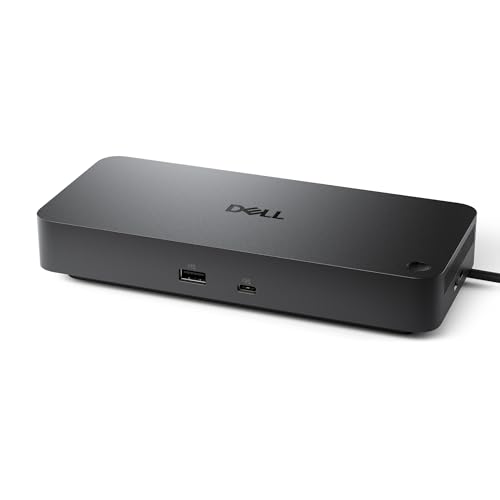
This dock is best for the power user who demands a multi-monitor setup and consistent peripheral expansion. It handles the heavy lifting required for high-end productivity, making it a standout for professional environments.
I think the quad display support is the headline feature here. It provides enough bandwidth to ensure that your workflow remains smooth even when you are pushing several high-resolution monitors simultaneously.
The 100W power delivery is sufficient for most modern professional laptops.
Its design is tailored for a clean, professional office aesthetic.
Some buyers find the cable management requires a bit of planning on tighter desks.
Get It From Amazon Now: Check Price on Amazon & FREE Returns
3. Dell WD19S 180W Docking Station (130W Power Delivery) USB-C, HDMI, Dual DisplayPort, Black

An unexpected feature of this unit is its modular design, which allows you to upgrade or replace the connector module if the industry standard shifts. It is an intelligent way to future-proof your purchase without needing to replace the entire base.
I believe this makes it an excellent choice for standard office work where longevity is key. It balances a robust feature set with a compact footprint that fits easily on most workstations.
Users value the consistent performance of the 130W power delivery.
It is often cited as a reliable, no-nonsense dock for enterprise environments.
The lack of an included 3.5mm audio jack is a minor gripe for some users.
Get It From Amazon Now: Check Price on Amazon & FREE Returns
4. Dell Docking Station WD19S 180W, USB-C, USB 3.2 Gen 2 Type-C, Dual DisplayPort 1.4, HDMI 2.0, Gigabit Ethernet, Black

The most common complaint regarding this model is its price point, which sits higher than basic universal alternatives. However, when you look at the balanced performance and hardware integration, it is clearly the top choice for daily tasks.
I’d argue that the premium is worth the peace of mind. It avoids the stability issues that often plague cheaper docks, serving as the reliable backbone of a productive office desk.
It is frequently praised for its seamless integration with Dell systems.
The dual DisplayPort 1.4 output is a favorite for high-resolution setups.
Buyers note that the build quality feels more substantial than plastic alternatives.
Get It From Amazon Now: Check Price on Amazon & FREE Returns
5. Anker Prime Docking Station, 14-in-1 Laptop Docking Station Dual Monitor | Dual 4K HDMI, 160W Max Output, 10Gbps Data Transfer, Smart Interface, Audio and Ethernet Ports for Dell, HP, Lenovo and More

Compared to the Dell WD19S, this unit prioritizes port variety over brand-specific optimization. It is essentially a Swiss Army knife for your desk, offering more connection types than the average professional will ever need.
I think this is a fantastic alternative for a mixed-hardware environment. If you have to switch between different laptop brands, the 160W output ensures you have enough overhead for almost any device.
The high port count is a frequent highlight in positive reviews.
Users appreciate the sleek, modern design compared to industrial office docks.
Some buyers mention the higher price reflects the added convenience of so many ports.
Get It From Amazon Now: Check Price on Amazon & FREE Returns
6. Dell WD19 130W Docking Station (with 90W Power Delivery) USB-C, HDMI, Dual DisplayPort, black
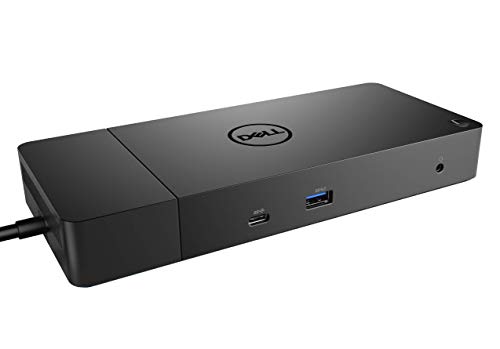
This dock gained popularity as the standard-issue workhorse for corporate fleets, but that reputation is only partially earned today. While it handles basic charging, it can struggle when pushed to support high-end, high-resolution display configurations.
In my opinion, it is best suited for light office work. Do not expect it to power your most demanding setups without occasional thermal throttling under heavy load.
It remains a popular choice for those wanting a budget-friendly branded solution.
Buyers report that it works perfectly for standard 1080p monitor setups.
The 90W power delivery is adequate but not stellar for modern gaming laptops.
Get It From Amazon Now: Check Price on Amazon & FREE Returns
7. UGREEN USB C Docking Station Dual Monitor, 7-in-1 Aluminum Dock with 2xHDMI | Dual 4K@60Hz, 4x10Gbps USB-A&C Data Port, 100W PD, Revodok Pro Laptop Docking Station for HP, Thinkpad, Dell and More Laptop

This dock earned its ranking by being the ultimate choice for minimalist desk setups that demand a clean, aluminum-clad aesthetic. Its primary strength lies in its ability to consolidate cables while maintaining a small footprint.
I find the design refreshing in a market filled with bulky, industrial-looking plastic boxes. It packs essential 10Gbps data speeds into a frame that barely occupies any space on your desk.
Users love the sleek aluminum build quality.
The dual 4K at 60Hz support is highly regarded by visual creators.
Some buyers note that it can run warm during intensive data transfers.
Get It From Amazon Now: Check Price on Amazon & FREE Returns
8. Acer USB-C Docking Station Dual Monitor, 9-in-1 Laptop Dock with 2 HDMI | Laptop Docking Station with 4K@60Hz HDMI, USB A&C 3.0, SD/Micro SD, 100W PD Compatible with Acer/Dell XPS/HP/Mac (0.65FT)

This model is best for the creative professional who moves large media files frequently and requires integrated SD card readers. It simplifies the workflow by eliminating the need for separate dongles for camera memory cards.
I think the value here is in the convenience. You get a versatile hub that bridges the gap between your laptop and your external media storage without sacrificing display performance.
The inclusion of SD and Micro SD slots is a frequent point of praise.
Buyers appreciate the 100W power delivery for fast charging.
Some users report needing a firmware update to optimize dual monitor stability.
Get It From Amazon Now: Check Price on Amazon & FREE Returns
9. Dell WD15 Monitor Dock 4K with 180W Adapter, USB-C, (450-AEUO, 7FJ4J, 4W2HW) (Renewed)

An interesting feature of this renewed unit is the sheer value it provides to budget-conscious buyers who need multiple monitor support without the current market price tag. It proves that you do not need the newest hardware to maintain a functional workstation.
In my view, this is the smartest pick for a secondary office or a home setup on a budget. It offers the same reliable architecture as its non-renewed counterparts at a fraction of the cost.
Users often remark on the excellent cost-to-performance ratio.
Renewed status is generally viewed as a reliable way to save money.
A few buyers note that the original box packaging varies, but the hardware works as intended.
Get It From Amazon Now: Check Price on Amazon & FREE Returns
Choosing Between Them
The Dell WD19S 180W is my top recommendation because its consistent power delivery and broad compatibility make it the most reliable choice for a Dell workstation. If you need maximum flexibility for various devices, the Anker Prime is excellent, while the UGREEN Revodok Pro serves those who prefer a minimalist aesthetic. For legacy hardware, the Dell WD15 remains the most budget-friendly path to a multi-monitor desk.
It is worth noting that while branded docks provide the best stability for their native systems, universal options often struggle with proprietary charging protocols or specialized display drivers. Always verify your laptop's specific power requirements before choosing a unit to ensure you avoid compatibility bottlenecks that can limit your performance.
As an Amazon Associate, this site earns from qualifying purchases. Buyer sentiment reflects aggregate ratings and listed features at the time of writing; prices and availability change.
