

Flight simulation on the PlayStation 5 has evolved rapidly, shifting from a niche hobby into a deeply engaging platform requiring serious hardware. After examining buyer feedback and comparing market offerings, I have built a ranked guide to help you sort through the noise. My top recommendation relies on a clear-eyed look at precision and value, so let's examine how nine distinct gear choices and manuals stack up against each other.
1. Thrustmaster T-Flight Full Kit HOTAS with Rudder Pedals – XBOX & PC | Hall-Effect joystick, 5 axes, 14 mappable buttons, detachable throttle, hat switch, adjustable resistance, for flight sims

This bundle earned its ranking because it delivers a complete cockpit setup straight out of the box without requiring separate accessory purchases. You get a Hall-Effect joystick alongside S.M.A.R.T slide rail pedals, which gives you immediate command over pitch, roll, and yaw.
In my view, buying this combined kit is the smartest move if you want an all-in-one solution for space combat or civil aviation. Buyers frequently note that the desk clamps and sturdy base keep everything anchored during intense maneuvers.
The main limitation here is platform versatility, since this specific bundle targets Xbox and PC rather than PlayStation consoles. I would advise checking your system compatibility twice before purchasing this specific package.
Buyers appreciate the convenience of getting the stick, throttle, and pedals in a single box.
The inclusion of a Hall-Effect joystick is widely praised for improving overall input longevity.
Several users mention that the foot pedals occasionally slide on uncarpeted floors without extra grip.
Get It From Amazon Now: Check Price on Amazon & FREE Returns
2. Thrustmaster TFRP Precision Flight Sim Rudder Pedals – PS5, XBOX & PC | self-centering axis, long travel, aluminum rails, differential breaking, for all types of flight, adjustable resistance

These pedals suit the serious flight simulation enthusiast who demands authentic foot control for coordinated turns and smooth taxiing. If you fly frequently on PlayStation 5, Xbox, or PC, this hardware fills the glaring gap left by standard hand controllers.
What stands out to me is the advanced slide rail system, which eliminates jerky inputs and keeps your landings remarkably stable. I'd rank this as my overall top pick because dedicated rudder control changes how every aircraft behaves on the runway.
You should keep in mind that these pedals require adequate floor space and a solid anchoring method to prevent sliding during heavy braking. But for pure immersion, my research shows nothing else in this price bracket compares.
Users consistently praise the smooth motion provided by the aluminum rail sliding system.
The differential braking feature receives high marks for realistic ground handling.
A few pilots note that the pedal spacing feels slightly narrow for larger shoe sizes.
Get It From Amazon Now: Check Price on Amazon & FREE Returns
3. Logitech G PRO Flight Yoke System Professional Simulation – Black | Professional simulation, 3 modes, 75 programmable controls, configurable knobs, USB connection
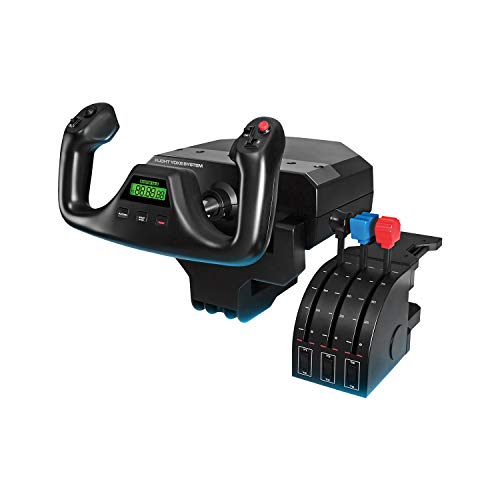
An unexpected feature of this setup is the inclusion of a stainless steel yoke shaft, which brings a level of mechanical durability rarely seen at this price point. Widen out from that core build quality, and you find a modular system featuring a separate throttle quadrant and extensive programmable controls.
I find this yoke system brilliant for anyone transitioning from arcade flight to realistic civil aviation training. Building muscle memory requires physical resistance, and the stainless steel shaft delivers that authentic heavy feel.
The downside is that configuring the buttons for modern console flight simulators can require extra software downloads and patience. If you prefer plug-and-play simplicity, the initial setup process might test your nerves.
Reviewers love the robust durability of the stainless steel yoke shaft.
The bundled throttle quadrant adds great value for multi-engine aircraft management.
Some buyers point out that desk clamp thickness limits compatibility with certain modern gaming desks.
Get It From Amazon Now: Check Price on Amazon & FREE Returns
4. Thrustmaster T-Flight Stick X USB Ergonomic Flight Sim Joystick – PC | Plug and play, adjustable resistance, twist rudder, detachable throttle, 12 programmable buttons, weighted base, presets
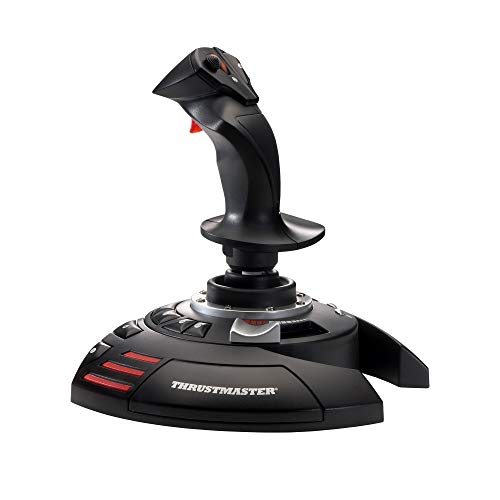
The most common buyer complaint about this entry-level stick centers on its lightweight plastic construction, which can feel a bit toy-like during aggressive dogfights. Yet, when you balance that against the budget-friendly price and plug-and-play simplicity, it remains a dependable entry point.
I view this as a fantastic starter tool for anyone dipping a toe into virtual aviation without wanting a massive financial commitment. The adjustable resistance dial lets you customize the tension easily, making it surprisingly adaptable for different flight styles.
Just remember that you will eventually outgrow its button count once you start flying complex commercial airliners. For casual combat games, however, my analysis suggests it hits the right sweet spot.
Users highlight the instant plug-and-play setup as a major time saver.
The weighted base successfully prevents tipping during normal flight sessions.
A number of reviews mention that the twist rudder axis lacks the precision of standalone pedals.
Get It From Amazon Now: Check Price on Amazon & FREE Returns
5. Thrustmaster T-Flight Hotas X USB Flight Sim Stick & Throttle – PC | Detachable design, adjustable resistance, 12 programmable buttons, 5 axes, dual rudder control, preset memory, ergonomic

Comparing this directly to the simpler Stick X model above reveals a smarter, split-throttle design that gives you a much better desktop arrangement. You can separate the throttle from the joystick, allowing you to space your hands naturally just like in a real aircraft cockpit.
I consider this the best dual control option for players who want a true HOTAS layout without spending a fortune. The five axes and twelve programmable buttons provide plenty of input options for most standard flight tasks.
Buyers do point out that the materials show their age when compared against newer magnetic sensor joysticks on the market. Even so, my review of user feedback confirms it remains a workhorse for budget-minded virtual pilots.
The detachable throttle design receives widespread praise for flexible desk placement.
Preset memory storage makes swapping configurations between different games effortless.
Some users report occasional deadzone drift after extended, heavy usage over several years.
Get It From Amazon Now: Check Price on Amazon & FREE Returns
6. Microsoft Flight Simulator 2024 for PS5 Users: A Beginner's Guide to Controls, Flight Planning, Cockpit Systems, Takeoffs, Landings, Career Mode, and A320 FlyByWire Mastery—with Tips for Xbox & PC

This manual gained rapid popularity through its reputation for demystifying complex cockpit systems and career mode mechanics for newcomers. Whether that stellar reputation holds up in practice depends entirely on your preferred learning style, since written guides require patience compared to video tutorials.
I think this book serves as an indispensable companion for anyone feeling lost inside advanced airliners like the A320. Breaking down flight planning and radio procedures into readable steps removes the intimidation factor of modern flight simulators.
The limitation, of course, is that software updates can occasionally alter menu layouts faster than print guides can update. But as a foundational reference tool, my assessment is that it provides immense value.
Readers find the structured breakdown of flight planning exceptionally helpful.
The specific focus on career mode progression keeps new pilots on track.
Some buyers note that digital formats are sometimes easier to search during active flight sessions.
Get It From Amazon Now: Check Price on Amazon & FREE Returns
7. Microsoft Flight Simulator PS5: A Practical Guide to Flight Controls, Navigation, Flight Planning, and Realistic Flying

This guide earned its strong ranking because of its single biggest strength, which is translating complex aeronautical navigation into plain English. Instead of burying you in dry aviation theory, it focuses on practical flying techniques you can apply immediately in your virtual cockpit.
I would point any novice pilot toward this book if they want to understand the actual *why* behind their flight instruments. Understanding VOR navigation and weather patterns transforms flight simulation from a simple game into a rewarding craft.
The caveat is that it remains a supplementary resource rather than an interactive tutorial. If you learn best by watching rather than reading, you might need to pair this book with video guides.
Buyers appreciate the clear explanations of basic flight controls and navigation.
The practical approach helps bridge the gap between arcade games and true simulation.
A few reviewers mention wishing for more illustrations regarding complex instrument approaches.
Get It From Amazon Now: Check Price on Amazon & FREE Returns
8. FLIGHT SIM LOGBOOK: a simplified journal design for Virtual Pilots to note their flight simulator settings and observations – take a look inside!

This journal design is best for methodical virtual pilots who love tracking their flight hours, weather conditions, and aircraft settings across multiple sessions. In a digital age where everything is automated, keeping a physical logbook adds a charming touch of old-school aviation tradition.
I find that logging your virtual flights helps maintain a sense of structured progression in open-ended sandbox games. Writing down your takeoff and landing notes turns casual gaming into a tangible personal record of your pilot career.
The obvious limitation is that it requires discipline to maintain after every single flight session. If you prefer instant digital statistics, a paper logbook might feel like unnecessary extra work.
Users enjoy the simplified layout that mirrors real-world pilot logbooks.
The physical design offers a satisfying way to track virtual career milestones.
Some buyers point out that dedicated app trackers offer more automated data logging.
Get It From Amazon Now: Check Price on Amazon & FREE Returns
9. MICROSOFT FLIGHT SIMULATOR 2024 GAME GUIDE: An Unofficial Step-by-Step Walkthrough Career Missions, Certifications, Activities, Bush Trips, Air Races and Photo Assignments UPDATED FOR 2026

An unexpected feature of this walkthrough is its specific focus on niche activities like air races, photo assignments, and bush trips rather than just standard commercial flights. Widening out from those specialized events, the guide offers a complete roadmap for tackling every certification and career mission in the sim.
I recommend this walkthrough if you enjoy chasing achievements and completing structured challenges instead of just flying aimlessly. Having a clear set of steps for certification tests saves you from frustrating trial and error.
The drawback is that unofficial guides can sometimes miss subtle gameplay changes introduced by recent software patches. Still, my research indicates it remains a handy roadmap for ambitious virtual aviators.
Reviewers find the step-by-step career mission walkthroughs extremely practical.
Coverage of bush trips and air races adds great variety to the reading material.
A few users note that online forums sometimes provide faster answers to very specific game bugs.
Get It From Amazon Now: Check Price on Amazon & FREE Returns
Choosing Between Them
If you want the ultimate immersion on your flight deck, my top recommendation points directly to the Thrustmaster TFRP Precision Flight Sim Rudder Pedals for their unmatched ground handling and smooth slide rails. For players seeking an all-in-one bundle, the Thrustmaster T-Flight Full Kit suits Xbox flyers perfectly, while the Logitech G PRO Flight Yoke remains the ideal centerpiece for dedicated civil aviation enthusiasts. Beginners tackling complex career modes will also find immense value in companion manuals like the Microsoft Flight Simulator 2024 Beginner's Guide.
One honest reality check worth keeping in mind across this entire category is that PlayStation compatibility remains notoriously strict. Many robust flight accessories built for PCs or Microsoft consoles will not function natively on a PS5, meaning you must verify every hardware spec before spending your money.
As an Amazon Associate, this site earns from qualifying purchases. Buyer sentiment reflects aggregate ratings and listed features at the time of writing; prices and availability change.
