

Desk clutter and tangled signal cables are the eternal enemies of any multi-computer workstation, turning a productive office into a frustrating maze of wire spaghetti. I have sifted through the market research and buyer feedback to see which hardware actually delivers seamless switching without dropping your display. In my view, buying an 8 port KVM switch requires balancing display resolution against port density. Let us look at the top contenders and see how they stack up.
1. 8 Port DisplayPort KVM Switch 4K@60Hz EDID Simulation, USB 3.0 DP KVM Switch for 8 Computers Share 1 Monitor and 4 USB Devices, Audio RS232,Wired Remote, 12V Power Supply & 8 USB Cables Included

This unit earned the top spot in my ranking because of its exceptional port speed and reliable 4K performance at 60Hz. It bridges the gap between high-end graphical workstations and everyday multitasking needs without breaking a sweat.
I appreciate how it includes EDID simulation to prevent your desktop arrangement from scrambling every time you switch inputs. You will also get four USB 3.0 ports for rapid peripheral sharing, though the hefty box and numerous cables demand serious desk planning.
Buyers frequently praise the swift USB 3.0 file transfer speeds across multiple connected computers.
The inclusion of all necessary cables in the box saves considerable setup time and extra spending.
Users highlight the dependable EDID emulation for keeping multi-screen window layouts perfectly intact.
Get It From Amazon Now: Check Price on Amazon & FREE Returns
2. HDMI KVM Switch 8 Computers 1 Monitor, 8 Ports USB 3.0 KVM Switcher Support 4K@60Hz for 8 PC Share Keyboard and Mouse, Support Hotkey Switching Way

Video editors and data analysts working primarily with HDMI gear will find this high-speed switcher to be an ideal match for their heavy workloads. It targets users who refuse to compromise on refresh rates while managing up to eight distinct host machines.
I think the addition of USB 3.0 connectivity makes a massive difference for anyone moving large media files between rigs. My research shows that while hotkey switching is generally responsive, you must follow the manual precisely to program your keyboard shortcuts.
Reviewers appreciate the stable 4K resolution at 60Hz for fluid motion during video playback.
The physical button layout offers a reliable backup if software hotkeys conflict with your operating system.
Several owners note that the unit runs slightly warm during continuous multi-hour computing sessions.
Get It From Amazon Now: Check Price on Amazon & FREE Returns
3. HDMI KVM Switch 8 Port, 4K@30Hz KVM Switch 8 Computers Share 1 Monitor and Keyboard & Mouse, with USB 2.0 Ports, Support Button Switch & Hotkey Switch & RS232, Adaptive EDID, Plug and Play

Surprising many users with its adaptive EDID recognition, this straightforward switch handles standard office multitasking with quiet efficiency. It strips away complicated configurations to give everyday administrators a dependable tool for managing legacy and modern PCs alike.
I would suggest this model for standard administrative desks where 30Hz refresh rates are entirely sufficient for spreadsheets and web browsing. In my evaluation of user feedback, the drop to 30Hz is a fair trade for the lower price point, provided you do not plan on gaming or fast-paced design work.
Buyers find the plug-and-play setup wonderfully simple for standard corporate office environments.
The inclusion of RS232 control appeals strongly to IT professionals managing server racks.
Some users mention that switching delays can take a couple of seconds longer than expected.
Get It From Amazon Now: Check Price on Amazon & FREE Returns
4. MT-VIKI 8 Port KVM Switch HDMI, 4K@30Hz 1U Rack Mount KVM Switch w/IR Remote & Wire-Desktop Controller & 8 HDMI KVM Cables & Rack Ears & Power Adapter

Rackmount hardware often suffers from a reputation for clunky interfaces and stiff buttons, yet this unit largely defies that stereotype while still demanding careful installation. It serves as a sturdy bridge between server management and desktop control, though novices might find the learning curve steep.
I find the included rack ears and wired desktop controller to be genuinely thoughtful additions for permanent server room setups. One recurring caution from buyers is that the remote control requires a clear line of sight, so placement matters immensely.
IT technicians frequently highlight the solid metal chassis as ideal for secure rack mounting.
The bundled HDMI cables are long enough for standard server cabinet configurations.
A few owners note that the infrared remote sensor can be finicky depending on room lighting.
Get It From Amazon Now: Check Price on Amazon & FREE Returns
5. GREATHEK 8 Ports HDMI KVM Switch 8 Computers Share 1 Monitor | 4K@30HZ|Hokey Switching| USB 2.0 |Adaptive EDID

Stepping down slightly from our third-place pick in terms of advanced features, this budget alternative focuses purely on core switching necessities. It mirrors the layout of simpler office units while offering a no-nonsense approach to sharing a single monitor across eight machines.
I consider this option a smart buy for budget-conscious offices that need basic adaptive EDID support without paying for extra network controls. You will not find ultra-fast USB 3.0 ports here, but standard peripherals connect and respond reliably.
Users consistently praise the straightforward button switching for ease of daily operation.
The compact footprint fits neatly on crowded office desks without demanding excessive clearance.
Several reviews point out that the 30Hz limit is less than ideal for rapid mouse movements.
Get It From Amazon Now: Check Price on Amazon & FREE Returns
6. KVM Switch 8 Ports with Hotkey, 8 in 1 Out USB 2.0 HDMI KVM Switcher Support 4K@30Hz for 8 PC Share Keyboard and Mouse, Compatible with Windows/Linux/Mac System etc

Built on a reputation for accessible desktop utility, this model gained traction among casual multi-PC users seeking an unpretentious setup. It promises broad compatibility across Windows, Linux, and Mac systems, making it a flexible choice for mixed-OS environments.
I believe its greatest strength lies in universal compatibility rather than raw performance speed. My analysis of buyer commentary reveals that while the hotkey switching works well, older keyboards with unusual polling rates may occasionally fail to trigger input changes.
Buyers note that the device integrates smoothly with mixed operating system networks.
The lightweight enclosure is easy to position discreetly behind a monitor stand.
Some users warn that the power adapter can feel slightly flimsy over long periods of continuous use.
Get It From Amazon Now: Check Price on Amazon & FREE Returns
7. TESmart 8X1 HDMI KVM Switch 8 port 4K@30Hz, EDID Emulation, Rackmount KVM | USB 2.0, Hotkey Switch | RS232 | LAN Port | IR Remote | IP Control | Auto Scan | with 8 Pcs 5ft KVM Cables

Advanced network control is the single biggest strength of this sophisticated unit, earning its place among heavy-duty hardware. It shines in environments where administrators need IP control and LAN port integration alongside standard desktop switching.
I am particularly impressed by the robust EDID emulation that prevents window resizing nightmares on complex setups. You do pay a premium for these enterprise-grade features, and casual users might find the extensive configuration options unnecessary.
Network engineers praise the IP control functionality for managing remote server arrays.
The auto-scan feature helps monitor multiple security feeds or server outputs effortlessly.
Reviewers frequently mention that the initial network setup requires patience and technical know-how.
Get It From Amazon Now: Check Price on Amazon & FREE Returns
8. MT-VIKI KVM Switch 8 Port, 8X1 Rackmount KVM Switch VGA, Included 8 2-in-1 KVM Cables & Wire-Desktop Selector & Power Adapter, Fit 1U 19'' Rack

Industrial environments and legacy workshops relying on older analog hardware will find this VGA switcher to be an indispensable tool. It caters specifically to technicians maintaining older machinery or specialized testing rigs that predate modern digital displays.
I appreciate that it arrives with eight 2-in-1 KVM cables right in the box, saving you from hunting down obsolete wiring. Naturally, the lower resolution and analog signal quality mean this is strictly for utility tasks rather than high-definition media consumption.
Maintenance technicians value the reliable connection for older industrial computer systems.
The included wire-desktop selector allows for convenient remote switching away from the main rack.
Users note that analog VGA ghosting can occur if cable runs are stretched beyond recommended limits.
Get It From Amazon Now: Check Price on Amazon & FREE Returns
9. 8 Port KVM Switch Displayport 8 Computers 1 Monitor EDID Emulation 4K@60Hz | USB 3.0 Displayport KVM Switch 8 PC 1 Monitor with 4 USB Ports, EDID, Audio, RS232, Wired Remote, 12V Power & 8 USB Cables

DisplayPort enthusiasts often struggle to find multi-port switches that maintain crisp high refresh rates, but this model tackles that challenge directly. It features robust EDID emulation and modern USB 3.0 connectivity tailored for high-end graphic design stations.
I find the inclusion of a wired remote to be a massive ergonomic win for keeping the main switch box tucked away. My research indicates that users love the 4K at 60Hz output, though the sheer volume of thick DisplayPort cables can create a management headache.
Creative professionals highlight the flawless high-refresh-rate video delivery across graphic workstations.
The four dedicated USB 3.0 ports handle external drives and drawing tablets without stuttering.
A few buyers point out that the unit requires careful ventilation to prevent heat buildup during rendering tasks.
Get It From Amazon Now: Check Price on Amazon & FREE Returns
10. 8 Port KVM Switch 2 Monitors 8 Computers 4K@60Hz EDID Simulation,8 PC HDMI Displayport Dual Monitor KVM Switch with 4 USB 3.0 Ports, Audio, RS232, Wired Remote, 12V Adapter & 8 USB Cables
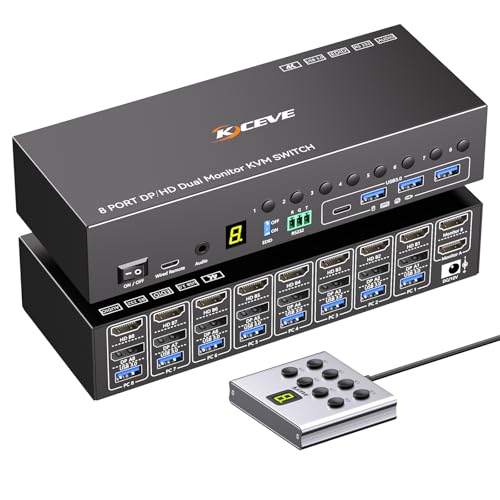
Multi-display workspaces often suffer from input lag and complicated wiring webs, yet this dual-monitor switcher attempts to tame the chaos. The most common buyer complaint involves the sheer complexity of wiring sixteen total video connections into a single box, but the payoff for productivity is massive.
I view this as a powerhouse solution for financial traders and video editors who refuse to downsize their dual-screen layouts. It supports stunning 4K resolution at 60Hz across both monitors, provided your host computers feature matching output hardware.
Power users praise the ability to drive dual screens across eight distinct host computers.
The included 12V power supply delivers stable current to all connected USB 3.0 peripherals.
Reviewers caution that managing two video cables per computer requires exceptional desk organization.
Get It From Amazon Now: Check Price on Amazon & FREE Returns
Choosing Between Them
In my view, choosing the right switcher comes down to matching your video outputs and daily workflow to the appropriate hardware. The DisplayPort 4K at 60Hz model takes the top spot because it combines smooth high refresh rates with rapid USB 3.0 data transfer, making it my ultimate recommendation for demanding power users. If you prefer high-speed HDMI, the second-place unit suits media editors, while basic office tasks are best handled by the straightforward third and fifth picks. Specialized environments will find strong value in the rackmount options and legacy VGA systems detailed above.
Buyers should note that managing eight computers simultaneously introduces inherent logistical hurdles regardless of the hardware you choose. High port-density setups require meticulous cable management, adequate desk ventilation, and careful attention to power supplies to ensure long-term stability.
As an Amazon Associate, this site earns from qualifying purchases. Buyer sentiment reflects aggregate ratings and listed features at the time of writing; prices and availability change.
