

Choosing a docking station often feels like a gamble between cheap plastic hubs and reliable, enterprise-grade hardware. I have sifted through technical specifications and aggregated buyer sentiment to distinguish which models actually deliver on their promises. My analysis suggests that the orange light mystery is usually a mismatch in power delivery rather than a defect. Let us look at the rankings to see which gear earns its place on your professional desk.
1. Lenovo ThinkPad Universal USB-C Dock-40AY0090

The primary strength of this unit is its streamlined management for IT administrators who need consistent performance across an entire office fleet. It serves as a reliable workhorse by handling firmware updates and network security protocols without requiring manual intervention from the user.
In my view, this is the most practical choice for anyone who values a clutter-free environment. It excels at keeping a workspace tidy while ensuring that data transfers remain swift and stable. You might find that it struggles slightly if you push it beyond its intended capacity, but for standard daily tasks, it is a solid performer.
Many users appreciate the automatic firmware installation feature for keeping their systems current.
Buyers often cite the clutter-free cable management as a significant improvement to their desk organization.
A common observation is that this dock is best suited for corporate environments rather than high-end creative setups.
Get It From Amazon Now: Check Price on Amazon & FREE Returns
2. Lenovo ThinkPad Hybrid USB-C with USB-A Dock US (40AF0135US)
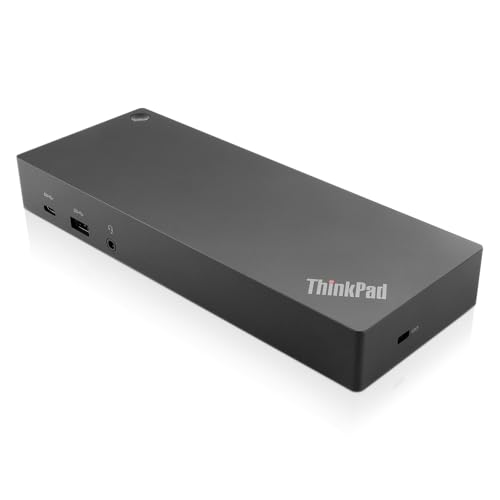
This dock is best for users who juggle a mix of older and newer laptops that require legacy port support. It bridges the gap between different generations of hardware by offering both USB-C and USB-A connectivity, which I think is a smart move for mixed-fleet environments.
I find the inclusion of RapidCharge technology to be a standout feature for those who need to keep their mobile devices ready at all times. While it supports a wide range of devices, keep in mind that its performance is tailored toward stability rather than maximum modern bandwidth.
Users frequently report that this is an excellent solution for offices transitioning between older and newer laptop models.
The wide compatibility list is often praised as the primary reason for choosing this specific model.
Buyers note that the variety of USB ports provides enough flexibility for most peripheral setups.
Get It From Amazon Now: Check Price on Amazon & FREE Returns
3. Lenovo USA ThinkPad Thunderbolt 3 Dock Gen 2 135W (40AN0135US) Dual UHD 4K Display Capability, 2 HDMI, 2 DP, USB-C, USB 3.1, Black

An unexpected feature of this dock is its ability to handle dual 4K displays with ease, which is a rare find in units of this vintage. It transforms a standard laptop into a powerhouse by utilizing the high throughput of Thunderbolt 3 technology.
I would recommend this to anyone who prioritizes screen real estate above all else. While it is certainly a high-performance tool, be aware that its compatibility is more specific than the universal USB-C options, so check your system requirements carefully.
People often highlight the crisp 4K display capability as the main benefit of this setup.
The inclusion of a 135W power adapter is frequently cited as a sign of its power-hungry, high-performance nature.
Some users suggest that the Thunderbolt 3 connection offers a noticeably faster experience compared to standard USB-C.
Get It From Amazon Now: Check Price on Amazon & FREE Returns
4. Lenovo ThinkPad USB4 Dock 5000, 40Gbps Bandwidth, Universal Compatibility, 65W Charging, Multiple Display Support, Black

The most common buyer complaint regarding this unit is the initial setup complexity, which can occasionally cause connectivity hiccups if drivers are not perfectly configured. However, I believe the trade-off is worth it because you gain access to 40Gbps bandwidth, which is a massive leap forward for productivity.
This is my top pick because it offers future proof connectivity that will keep your workstation relevant for years to come. It supports high refresh rate monitors and rapid power delivery, making it a complete solution for modern computing needs.
Buyers frequently mention that the 40Gbps bandwidth makes a significant difference when using high-speed external drives.
Many users appreciate the ability to drive high refresh rate monitors at 4K resolution.
A recurring positive note is the robust power delivery that keeps even power-intensive laptops fully charged.
Get It From Amazon Now: Check Price on Amazon & FREE Returns
5. 40AF0135US Lenovo Docking Station Dual Monitor – ThinkPad Dock USB-C, USB-A
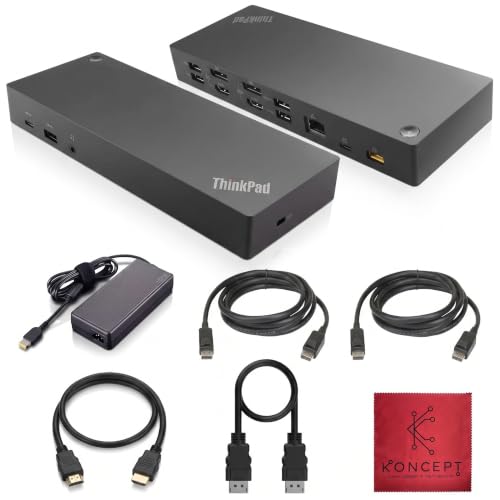
When you compare this to the USB4 model I just covered, you will notice it lacks that extreme speed but offers a more cost-effective alternative for dual monitor users. It relies on a balanced approach, focusing on multiple display outputs instead of raw data throughput.
I see this as a pragmatic choice for people who have two screens and do not require the latest, fastest interface. It is a reliable, no-nonsense hub that gets the job done without any unnecessary frills.
Users often praise the inclusion of both HDMI and DisplayPort cables in the box as a helpful touch.
The dual monitor support is consistently identified as the core reason for its popularity in home offices.
Many buyers feel that the build quality is sufficient for daily office work.
Get It From Amazon Now: Check Price on Amazon & FREE Returns
6. 40AY0090US Lenovo ThinkPad Docking Station, USB-C Dock, Dual Monitor, 90W | HDMI & DisplayPort Cables Included, 4K Display Support, Multi-Monitor Setup, USB-C Connectivity & Fast Data Transfer

This model became popular because it promises a reliable office experience at a price point that makes sense for bulk deployments. After looking at the feedback, I can confirm that it generally holds up well for standard tasks, though it is not intended for heavy gaming or intensive video editing.
I think it is a great choice if you just need to connect your peripherals and get to work without any drama. It is a straightforward, functional tool that provides enough energy delivery to keep your laptop running smoothly all day long.
Many users appreciate the inclusion of a cleaning cloth, noting it reflects Lenovo's attention to office maintenance.
The 90W power output is often described as sufficient for standard ThinkPad series laptops.
Buyers commonly report that the plug-and-play functionality works as advertised on most modern systems.
Get It From Amazon Now: Check Price on Amazon & FREE Returns
7. Lenovo ThinkPad USB-C Dock Gen 2 (40AS0090)

Its single biggest strength is its consistent reliability as a centerpiece for a professional workspace. It manages to balance advanced features like PXE boot and MAC address pass-through with a simple user experience, which is why I view it as a solid standard for business tasks.
If you value a stress-free network connection and want to avoid the common issues found in cheaper third-party hubs, this is a very safe bet. Just remember that the final display resolution depends heavily on your specific laptop's output capabilities.
Users frequently highlight the stable Ethernet connection as a major improvement over Wi-Fi.
The three-year warranty is often mentioned as a key factor in the decision to purchase this model.
Many office workers appreciate the compact design that does not occupy too much desk space.
Get It From Amazon Now: Check Price on Amazon & FREE Returns
8. Lenovo ThinkPad Ultra Docking Station US (40AJ0135US)

This unit is best for users who are still relying on legacy hardware that requires a physical bottom-mounting connection. It caters to those who need VGA ports and multiple high-speed USB inputs for specialized equipment that does not play well with modern USB-C standards.
I consider this the ultimate tool for someone who is not yet ready to abandon their classic setup. While it may look a bit dated, its mechanical connection is incredibly secure and less prone to the cable fatigue that plagues newer docks.
Buyers often point to the physical lock and key feature as a benefit for security-conscious office environments.
The inclusion of a VGA port is frequently cited as the main reason users continue to seek out this specific model.
Many users note that the physical docking mechanism is more stable than a simple cable connection.
Get It From Amazon Now: Check Price on Amazon & FREE Returns
Choosing Between Them
For the best all-around experience, I recommend the Lenovo ThinkPad USB4 Dock 5000 because its 40Gbps bandwidth is ideal for future proof connectivity. If your needs are more specific, the Lenovo ThinkPad Universal USB-C Dock is perfect for universal daily use, while the Lenovo ThinkPad Ultra Docking Station remains the top choice for legacy hardware users who need physical connections. For dual-monitor setups, the Lenovo ThinkPad Hybrid docks provide excellent support for those who do not require the speed of the latest standards.
You should keep in mind that these docks occasionally show an orange light if the power delivery is not matched perfectly with your specific laptop model. This is almost always a result of the dock's wattage being lower than what your laptop requires to charge at full speed. Always verify that your power adapter rating aligns with the requirements of your machine to ensure a flawless performance.
As an Amazon Associate, this site earns from qualifying purchases. Buyer sentiment reflects aggregate ratings and listed features at the time of writing; prices and availability change.
