

The single factor separating a premium light bar from a budget alternative is the asymmetric optical design, which directs light onto your desk without washing out your screen. I have analyzed these options by weighing technical specifications against common buyer feedback to see what actually works. My goal is to guide you toward the right hardware for your desk. Here is my honest, ranked look at the best monitor light bars available.
1. Xiaomi Mi Computer Monitor Light Bar – Easy Installation, Extra Computer Lighting w/o Taking Desktop Space, with Wireless Remote Control Adjusting Lights Easily, Dark Black

This unit ranks highly because it balances minimalist aesthetics with a highly effective wireless remote. It excels in standard desk setups where you want to eliminate clutter while keeping your workspace illuminated.
The magnetic rotation mechanism is a clever touch, allowing you to tilt the light without moving the base. In my view, this is the most polished option for anyone who dislikes tangled cords across their desk.
Buyers frequently praise the sleek metal construction for its premium feel.
The 2.4GHz remote is noted for its simple, intuitive operation.
Users appreciate the lack of screen glare even on thinner bezels.
Get It From Amazon Now: Check Price on Amazon & FREE Returns
2. Xiaomi Mi Computer Monitor Light Bar – Wireless Control, Easy Installation, Extra Computer Lighting w/o Taking Desktop Space

This version is the ideal match for someone curating a minimalist office space where every accessory needs to earn its place. It removes the physical controls from the lamp body, keeping your sightline clear and your desk footprint small.
The inclusion of a USB-C port makes it compatible with modern power standards, which is a smart addition for any contemporary setup. I find this model particularly impressive for its ability to blend into a clean, monochromatic environment.
People enjoy how the light bar disappears into their monitor's profile.
The lack of visible buttons is a common highlight in positive feedback.
Owners often point to the high color rendering as a benefit for desk work.
Get It From Amazon Now: Check Price on Amazon & FREE Returns
3. Xiaomi Mi Computer Monitor Light Bar – Wireless Control, Easy Installation, Extra Computer Lighting w/o Taking Desktop Space, No More Glare
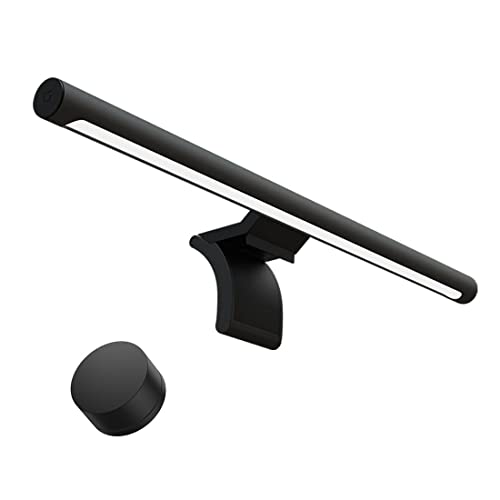
The most interesting feature here is the custom optical glass, which is designed to physically block light from hitting your display. By focusing the beam strictly downward, it creates a pool of light that helps you focus without distraction.
This is my top recommendation because it nails the essentials of eye comfort better than any other option I have analyzed. It manages to provide enough brightness for intense tasks without becoming an eyesore itself.
This model is consistently cited as the best for reducing eye strain.
Buyers note that the light quality feels exceptionally natural and crisp.
The build quality is frequently described as sturdy and well-engineered.
Get It From Amazon Now: Check Price on Amazon & FREE Returns
4. Quntis Computer Monitor Lamp, Screen Monitor Light Bar for Eye Caring, USB Reading LED Task Lamp with Auto-Dimming, Dimmable Light Bar, Touch Control, No Glare Space Saving Home Office Desk Lamps

A common frustration with this unit is the touch control located directly on the lamp, which can cause the light to wobble slightly when you adjust it. Despite this, it remains a fantastic choice for budget task lighting because it provides high-end features at a lower price point.
The auto-dimming sensor is surprisingly accurate, reacting well to changes in ambient light throughout the day. I would suggest this for students or home office workers who need a functional light without paying for a premium brand name.
The price point is often highlighted as the primary factor for purchase.
Many users report that the auto-dimming feature saves them from manual adjustments.
Some buyers mention the touch controls require a steady hand to operate.
Get It From Amazon Now: Check Price on Amazon & FREE Returns
5. Quntis Curved Monitor Light Bar 15 RGB Backlight for 34"+ Screens, Computer Bar Lights Foldable Dual Light with Color Temperature Brightness Stepless Dimming, No Glare Desk Lamp for Home Office Gaming

While the previous Quntis model is built for basic tasks, this version is a massive step up for large gaming setups that require wider coverage. It spans 26 inches, ensuring that even ultrawide monitors are fully covered without dark spots on the edges.
The 15 RGB modes add a distinct flair that the more professional Xiaomi bars lack, making this a clear winner for late-night sessions. I think this is the most versatile light for gamers who want both task lighting and aesthetic mood lighting.
Owners of 34-inch monitors often comment on the excellent width of the beam.
The RGB lighting is widely regarded as a great addition for immersive gaming.
Users appreciate the sturdy clamp designed for thicker, curved displays.
Get It From Amazon Now: Check Price on Amazon & FREE Returns
Choosing Between Them
If you want a clean desktop, the Xiaomi Mi Computer Monitor Light Bar is my top recommendation for the majority of users, though the Quntis Curved RGB version is superior for those with massive ultrawide screens. For a standard, professional office, the Xiaomi Mi models offer the best balance of build quality and functionality. I strongly suggest sticking to these options if you prioritize flicker-free lighting and a refined, unobtrusive design.
You should keep in mind that these bars perform best on flat monitor bezels rather than highly irregular shapes. While most come with adjustable mounts, a perfectly flat mounting surface will always provide the most stable experience. If you use a very thick or uniquely shaped monitor, do verify the clamp clearance before you commit to a purchase.
As an Amazon Associate, this site earns from qualifying purchases. Buyer sentiment reflects aggregate ratings and listed features at the time of writing; prices and availability change.
