

The biggest mistake buyers make is assuming all M.2 slots are the same, leading to a pile of incompatible hardware. I have analyzed these adapters based on technical specifications and common feedback patterns to help you avoid that frustration. These devices aren't universal, but choosing the right protocol support and form factor makes all the difference. My goal is to guide you toward a reliable connection without any costly guesswork.
1. StarTech M.2 PCIe NVMe to U.2 SFF-8639 Adapter, 2.5in, TAA (U2M2E125) | PCIe M.2 NVMe/AHCI SSD to 2.5in U.2 host adapter/converter, Up to 7.8GBps PCIe Gen 4, Not for SAS or SATA drives
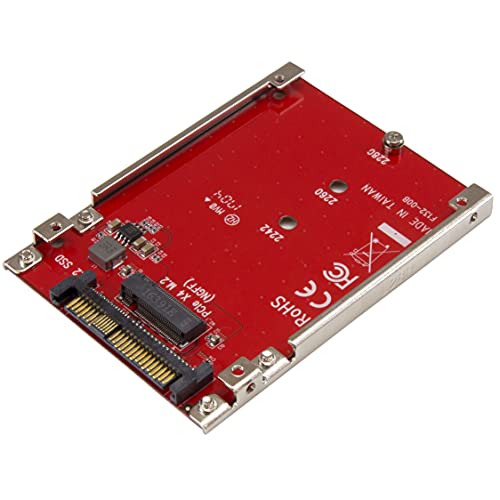
This adapter earns its place because it is the only option here capable of handling high-speed PCIe Gen 4 throughput. It is specifically designed for enterprise-grade environments where you need to fit a modern M.2 NVMe drive into a 2.5-inch U.2 server bay.
I find this to be a niche but powerful solution for professionals. It bypasses the slower SATA bottlenecks entirely. Just keep in mind that it is strictly for NVMe and will not work with standard SATA drives.
Buyers frequently identify this as the only viable path for upgrading legacy server storage to modern speeds.
The robust build quality is often highlighted as a major benefit for continuous, high-demand operations.
Users note that the lack of SATA support is a critical distinction to check before purchase.
Get It From Amazon Now: Check Price on Amazon & FREE Returns
2. M.2 NGFF to SATA3 Adapter, B+M Key SSD, No NVMe, Driver-Free | Convert SATA M.2 to Standard 2.5” SATA 6Gbps Drives; Fits 2230/2242/2260/2280 SSDs, Not Compatible with PCIe NVMe SSD
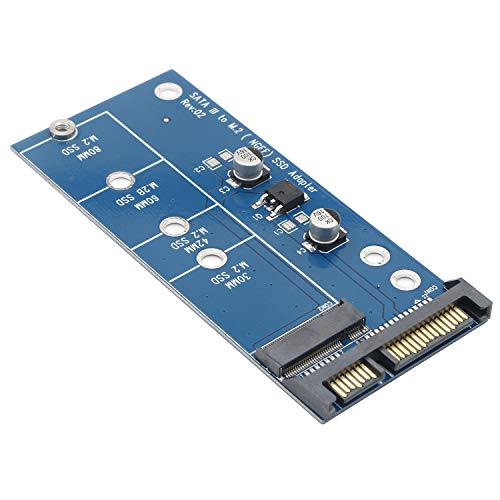
This adapter is ideal for the budget-conscious user or someone looking to repurpose an older M.2 SATA SSD that would otherwise sit in a drawer. It effectively acts as a bridge for legacy systems that lack native M.2 slots, allowing you to use those drives as standard 2.5-inch storage.
I appreciate the inclusion of filter capacitors and voltage regulators, which suggest a focus on power stability. Be aware that this hardware does not support NVMe drives. If you try to force an M-key NVMe stick into this, it simply will not function.
Reviewers often point out that this is an effective way to rescue older hardware for secondary storage.
The requirement to partition and format a new drive is a common stumbling block for first-time users.
Many users note that the unit can run warm, which is a standard characteristic for this type of converter.
Get It From Amazon Now: Check Price on Amazon & FREE Returns
3. ELUTENG M.2 to SATA Adapter – 2 in 1 Converter for MSATA/M.2 NGFF SSD to 2.5" SATA III, Supports B&M Key, Not for M Key

The most interesting feature here is the manual toggle switch, which allows you to swap between NGFF and mSATA formats. It is a clever, if slightly mechanical, way to ensure one device handles two different aging storage standards.
In my view, this is perfect for someone with a collection of old drives who needs a flexible diagnostic tool. It does not support NVMe, so do not let the 4TB capacity claim lead you to believe it can handle modern, high-speed gaming drives.
The manual switch design is widely praised for its simplicity and clear functionality.
Users often mention that checking the SSD label for "PCIe" or "NVMe" text is essential to avoid disappointment.
The compact, durable casing is frequently cited as a key benefit for portability.
Get It From Amazon Now: Check Price on Amazon & FREE Returns
4. SSK M.2 NVME SATA SSD Enclosure, Improved RTL9210B Chip USB 3.2 Gen 2 10Gbps to PCI-E NGFF Adapter, M-Key/B+M Key External SSD Enclosure Aluminum Support UASP TRIM 2242/2260/2280

The most common complaint regarding this enclosure is the initial confusion over formatting, as the drive will not appear in your file manager until it is initialized in the OS settings. Once that hurdle is cleared, it is my top recommendation for portable external storage.
It supports both NVMe and SATA protocols, which makes it significantly more useful than single-protocol alternatives. The aluminum alloy shell does a great job of dissipating heat during heavy transfers, keeping the drive performing well over long sessions.
The high-speed 10Gbps transfer capability is consistently recognized as a major upgrade over traditional USB drives.
Many users appreciate the inclusion of both USB-C and USB-A cables, which increases overall compatibility.
The blue status light is frequently mentioned as a helpful indicator for tracking data activity.
Get It From Amazon Now: Check Price on Amazon & FREE Returns
5. StarTech M.2 SATA SSD to 2.5in SATA Adapter, [NOT NVMe], 7mm (SAT32M225) | Open-frame bracket, 2230/2242/2260/2280, B/M+B key, Up to 6Gbps, Hard drive adapter, Not NVMe/AHCI, Fits 7mm bays
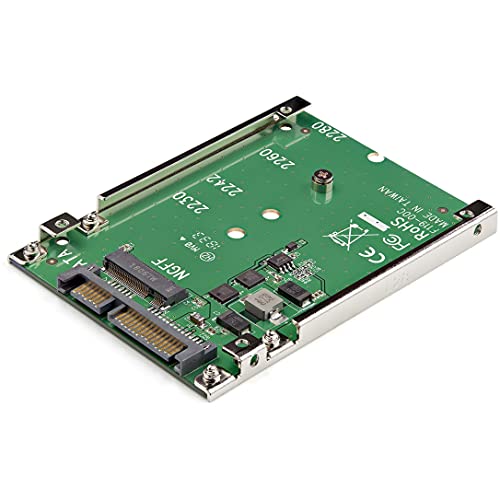
This bracket is a simplified, open-frame alternative to the StarTech U.2 adapter mentioned earlier, serving users who just need a physical mount for a SATA drive. It is stripped back to the basics, focusing entirely on heat dissipation and a slim profile that fits perfectly into standard 7mm drive bays.
I prefer this design for desktop builds where internal airflow is already sufficient. It is a straightforward, no-nonsense tool. Remember that it is strictly for M.2 SATA, so it remains incompatible with the faster NVMe drives found in modern laptops.
Buyers often praise the open design for keeping drives cool compared to fully enclosed alternatives.
The compatibility with various lengths like 2230 and 2280 is cited as a significant convenience.
Some users note that the lack of a protective cover makes it less suitable for external, mobile use.
Get It From Amazon Now: Check Price on Amazon & FREE Returns
6. 10Gtek M.2 to SATA Adapter, M-Key to SATA 3.0, ASM1166, with Tools | Supports SSD & HDD for Desktop PC, LED Indicator, Plug and Play Expansion

This unit became popular because it promises to turn a single M.2 slot into six separate SATA 3.0 ports. It is a heavy-duty expansion tool designed for desktop PCs that have run out of motherboard connectivity for extra hard drives.
While the ASM1166 chipset is a industry standard for reliability, I would warn that it does not support RAID configurations. It is designed for simple, direct storage expansion, and it performs that task well without needing complex drivers.
Users frequently report that the plug-and-play setup works seamlessly across various Linux and Windows versions.
The omission of hot-swapping capability is a recurring point of note in many discussions.
The included tools, such as the screwdriver and mounting screw, are often described as a thoughtful addition.
Get It From Amazon Now: Check Price on Amazon & FREE Returns
Choosing Between Them
My top pick is the SSK M.2 NVME SATA SSD Enclosure because it offers the best versatile compatibility for both drive protocols in a portable form factor. For those with specific needs, the StarTech U.2 adapter is the best for enterprise server upgrades, while the 10Gtek adapter remains the premier choice for desktop storage expansion. If you are dealing with older hardware, the M.2 NGFF to SATA adapter provides the most reliable legacy system support.
You should remember that these adapters are specialized tools rather than universal fixes for every hardware mismatch. Always confirm whether your drive is SATA or NVMe before you commit to a purchase, as mixing those two incompatible protocols is the single greatest cause of frustration. I hope this comparison clarifies which tool will actually solve your storage problem.
As an Amazon Associate, this site earns from qualifying purchases. Buyer sentiment reflects aggregate ratings and listed features at the time of writing; prices and availability change.
