

Many owners of the Raspberry Pi Zero struggle with finding a display that balances screen real estate with the compact form factor of the board. I have analyzed the common frustrations and buyer feedback to help you avoid the pitfalls of incompatible drivers and bulky setups. My goal is to simplify your search for the ideal screen. I find the iUniker 3.51 inch to be the clear winner for most projects.
1. iUniker 3.51 Inch Touchscreen for Raspberry Pi Zero 2W/2WH/W/Zero | 320×480 DPI LCD Display, 4-Wire Resistive Touch, 60Hz Refresh, GPIO Direct Connect, No Pi Board Included

This unit earned the top spot because it integrates directly onto the GPIO pins without requiring additional ribbon cables or messy adapters. It offers the most reliable 320×480 resolution for a screen this size, making it the most sensible choice for direct interface projects.
In my view, the 60Hz refresh rate provides a responsiveness that many other small displays simply lack. It feels like a natural extension of the Zero rather than a tacked-on afterthought.
Users frequently highlight the ease of installation as a primary benefit.
The direct GPIO connection eliminates common cable clutter.
Buyers appreciate the clear visibility of the interface despite the small scale.
Get It From Amazon Now: Check Price on Amazon & FREE Returns
2. 1.44inch LCD Display HAT for Raspberry Pi 5/4B/3B+/Zero/Zero W, 128×128 | SPI Interface RGB, 65K Display Color ST7735S Driver

This tiny screen is perfect for the minimalist who only needs to display system status, IP addresses, or simple text logs. Because it utilizes the SPI interface, it leaves your GPIO pins relatively free for other sensors or expansion modules.
I think this is a clever solution for those building headless servers or IoT monitors. It is certainly not for reading long documents, but it performs exactly as intended for quick data snapshots.
Reviewers note the crisp color reproduction for such a small display.
The compact footprint fits perfectly within tight, custom-printed enclosures.
Many users prefer this for its power efficiency.
Get It From Amazon Now: Check Price on Amazon & FREE Returns
3. Hosyond 7 Inch IPS LCD Touch Screen Display Panel 1024×600 | Capacitive Screen HDMI Monitor for Raspberry Pi5/Pi4/Pi3/ZERO W, BB Black, Windows 10 8 7

An interesting feature is its dual compatibility with both standard computing platforms and the Zero, which makes this screen feel like a versatile desktop monitor rather than a dedicated hobbyist tool. It functions more like a traditional display, offering a much larger canvas than the other options in this group.
I suspect this will appeal most to those who want a capacitive touch experience that mimics a tablet. It is quite a bit larger than the Zero itself, so you will need to account for a larger footprint in your workspace.
Many buyers mention the image quality is superior for viewing media.
The capacitive touch functionality is often praised for being accurate.
It is a popular choice for those building compact desktop workstations.
Get It From Amazon Now: Check Price on Amazon & FREE Returns
4. PiSugar Whisplay HAT for Raspberry Pi Zero 2 W, Zero WH & Pi 5:1.69" LCD Display Screen, Audio Expansion Board with Dual Microphones, Speaker & Codec, Voice Assistant & Smart Speaker Projects
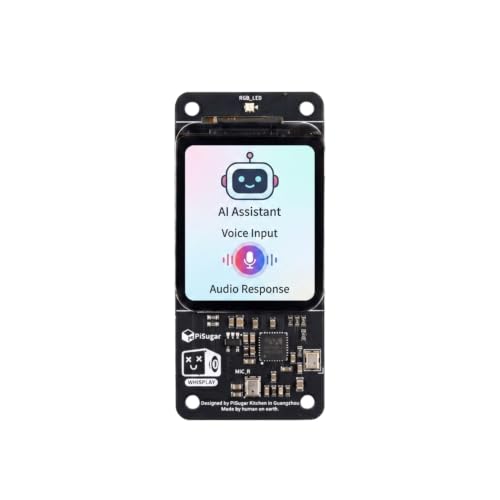
A common complaint is that the integrated hardware features can be somewhat complicated to configure, which might intimidate those who just want a plug-and-play screen. However, once you manage the software setup, you gain a powerful all-in-one expansion board that handles audio and visuals in a single package.
I believe this is an excellent tool for voice assistant projects where space is at a premium. It consolidates speakers and microphones into one tidy layer.
Users consistently mention the convenience of having audio components built-in.
The software configuration is noted as a hurdle for beginners.
Many praise the integration for smart speaker builds.
Get It From Amazon Now: Check Price on Amazon & FREE Returns
5. 1.3inch LCD Display HAT Compatible with Raspberry Pi, IPS Screen 240×240 | Compatible with Raspberry Pi5/4B/3B+/3B/2B/Zero W/Zero 2W, RGB, 65K Display Color, SPI Interface
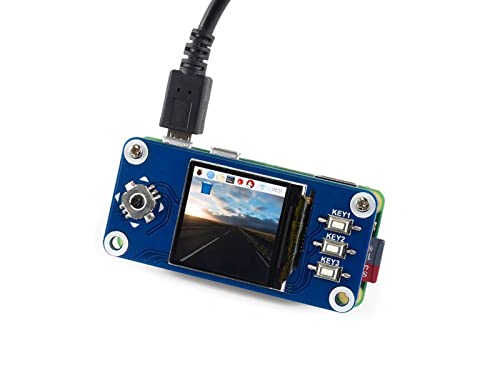
Compared to the 1.44 inch HAT, this screen offers a slightly different aspect ratio and a square resolution that some users find more logical for icons and status gauges. It uses the same SPI interface logic, providing a very similar installation experience for the developer.
I would suggest this for wearable data projects or wrist-mounted displays where every millimeter counts. It is a highly focused tool for specific data output.
Customers often prefer the square 240×240 layout for custom interfaces.
The vibrant colors are a frequent highlight in user assessments.
It is noted as being highly reliable for continuous uptime.
Get It From Amazon Now: Check Price on Amazon & FREE Returns
6. Hosyond 3.5 Inch 480×320 Touch Screen TFT LCD SPI Display Panel for Raspberry Pi B, B+, 2B, 3B, 3B+,4B, 5

This panel became popular because it was one of the early, affordable solutions for adding a screen to a retro gaming build. However, I find that its performance and resolution are starting to feel dated compared to newer, sharper, and more responsive alternatives.
While it is still a functional choice for simple emulators, I am not convinced it holds up against modern high-refresh displays. It remains a nostalgic pick for those sticking to older project tutorials.
Many reviewers note the screen is adequate for basic gaming interfaces.
The SPI speed can sometimes cause noticeable lag in fast-paced games.
Users often report that the setup requires specific driver patches.
Get It From Amazon Now: Check Price on Amazon & FREE Returns
Choosing Between Them
The iUniker 3.51 inch touchscreen is my top recommendation because it offers the most balanced resolution for the Zero form factor, making it the best for direct interface projects. I believe the 1.44 inch HAT is the superior choice for minimalist status displays, while the Hosyond 7 inch display is the way to go for desktop setups. The PiSugar Whisplay HAT serves custom voice assistants well, the 1.3 inch HAT excels at wearable data, and the Hosyond 3.5 inch remains a legacy choice for retro gaming enthusiasts.
You should remember that these small LCD panels often require specific driver configurations to function correctly, which can be the most time-consuming part of the build. Some displays may require editing config files or installing specific libraries to get the touch functionality and refresh rates in the ideal range. Be prepared to spend a little time in the terminal to ensure your chosen screen works perfectly.
As an Amazon Associate, this site earns from qualifying purchases. Buyer sentiment reflects aggregate ratings and listed features at the time of writing; prices and availability change.
